Key Takeaways
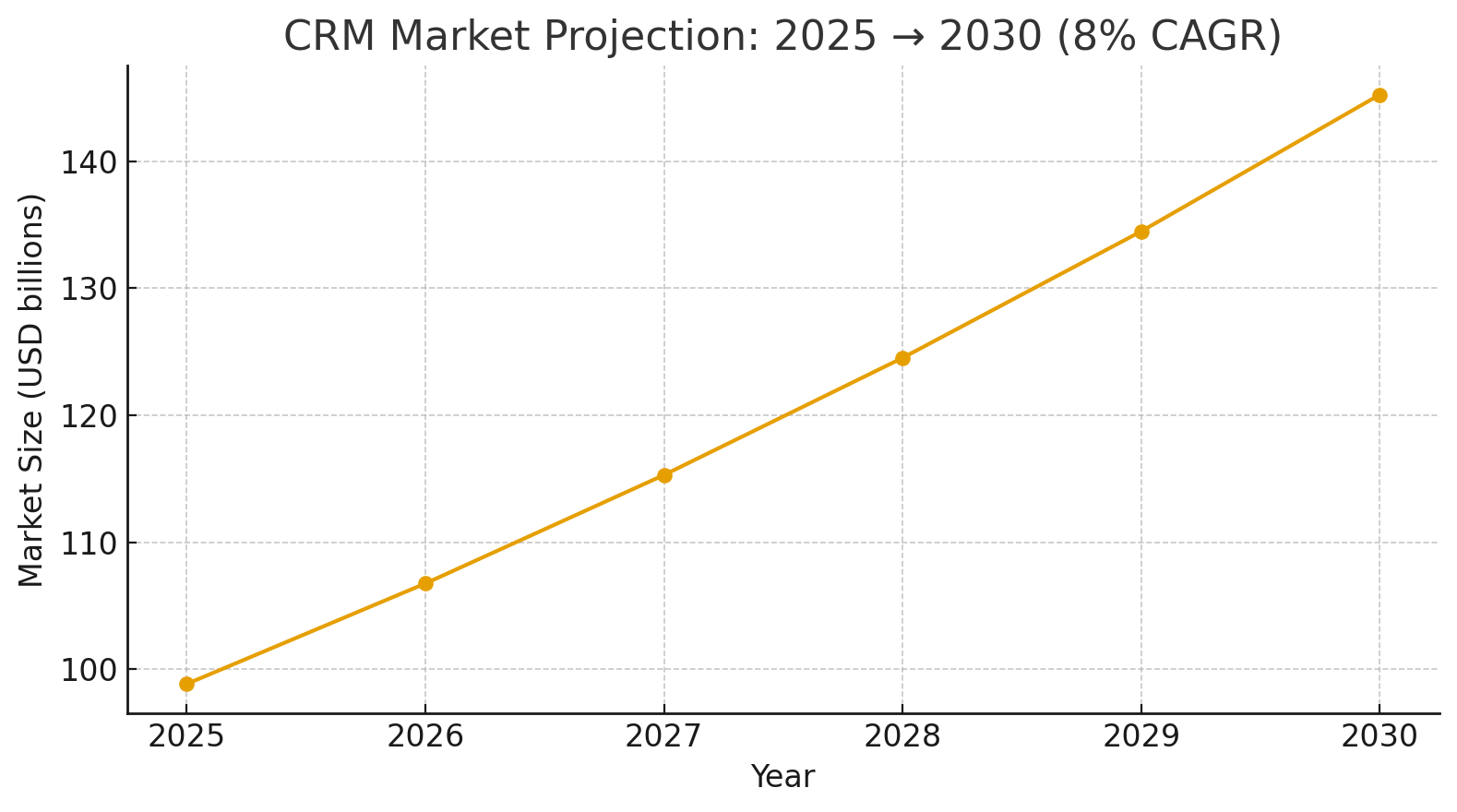
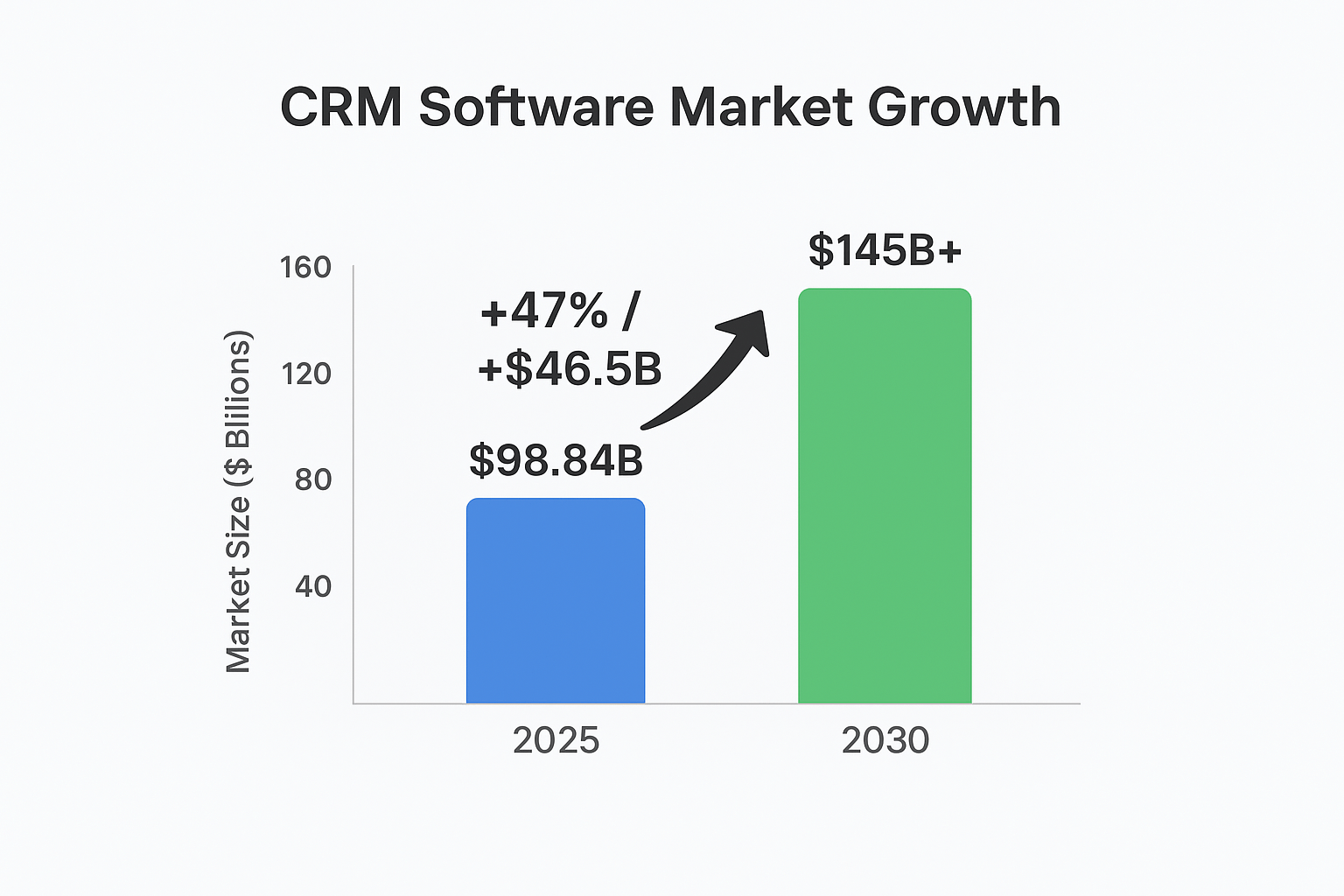
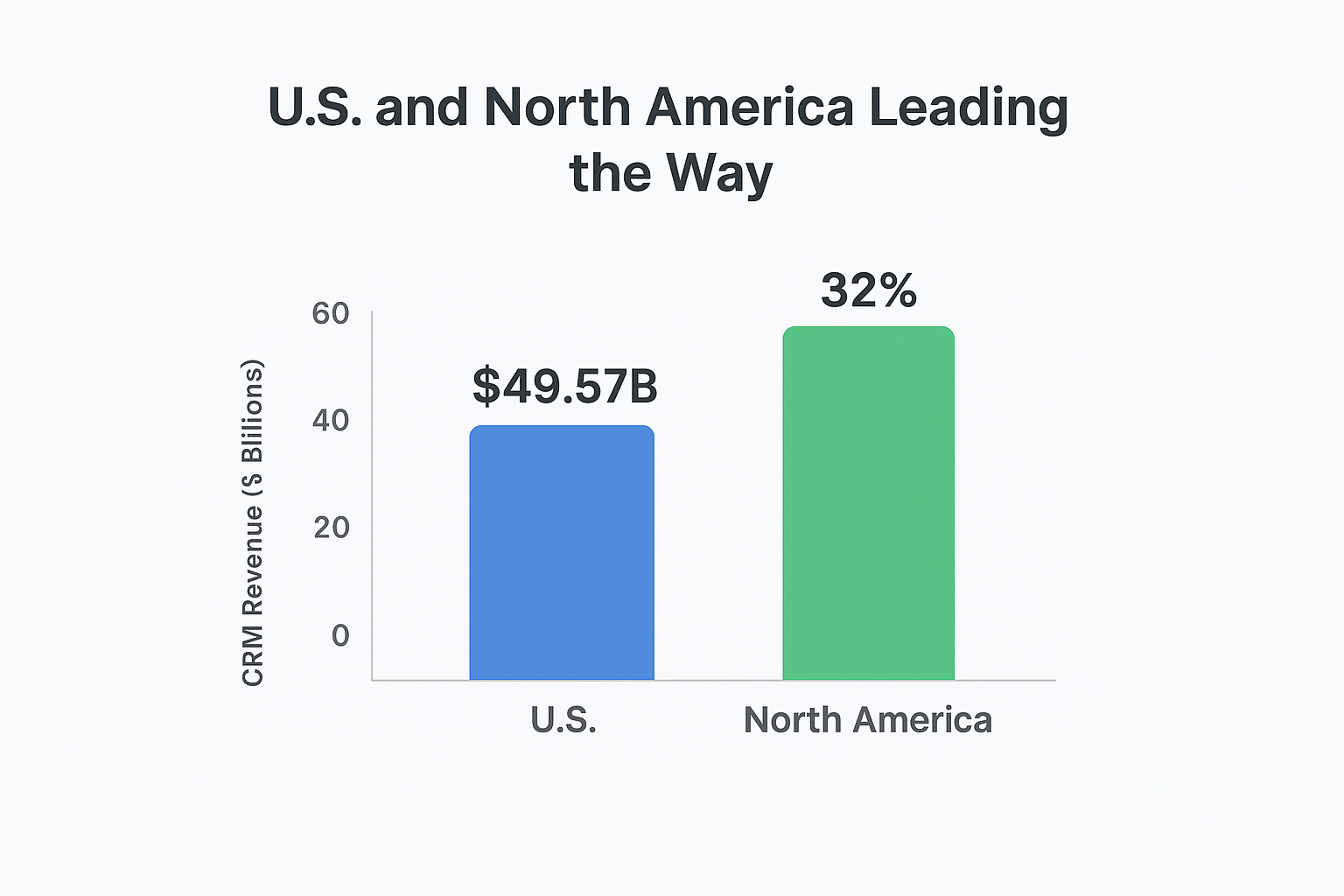
- CRM market is growing from $98.84B in 2025 to $145B by 2030, adding ~$46.5B. North America holds 32% share, with U.S. revenue at $49.57B.
- CRMs streamline sales, marketing, and support with automation and multichannel tools. Types include operational, analytical, collaborative, and strategic systems.
- Off-the-shelf CRMs are cheaper and faster but less flexible. Custom CRMs provide scalability, control, and no license fees.
- CRM budgets range from $10K–$25K (basic), $30K–$70K (mid-level), to $80K–$150K+ (advanced), depending on features, UX, and integrations.
- CRM success requires clear goals, wireframes, testing, deployment, and ongoing maintenance, plus modern stacks, compliance, and user-driven improvements.
What Is CRM Software Development?
The process of CRM software development is all about designing, building, and customizing systems that help businesses manage their interactions with current and potential customers. A CRM system tracks communication across all the main departments like sales, marketing, and customer service, centralizing data to improve relationships, streamline workflows, and boost profitability. Modern CRM tools can also integrate with other platforms and use AI to enhance customer engagement throughout the entire lifecycle.
Global CRM Market Stats and Growth Forecast
The CRM software market isn’t just growing, it’s booming. It’s set to jump from $98.84 billion in 2025 to over $145 billion by 2030, growing steadily at around 8% a year. That’s a clear sign that businesses everywhere are doubling down on tools that help them better manage customers and scale smarter.
- High Adoption Across All Business Sizes:
Between 2025 and 2030, the CRM software market is expected to gain nearly $46.5 billion in total revenue, an increase of over 47%. This isn’t just about big enterprises anymore; even smaller businesses are embracing CRM platforms to automate tasks, track interactions, and build better customer relationships from the ground up.
- U.S. and North America Leading the Way:
The U.S. is leading the charge, expected to pull in a massive $49.57 billion in CRM revenue in 2025. And with North America owning over 32% of the global market, it's obvious the region is setting the pace with AI-powered, mobile-first, and highly personalized CRM experiences.
What Is CRM Software?
CRM (Customer Relationship Management) software helps businesses manage customer interactions, streamline workflows, and boost sales. By centralizing data on one platform, it enables teams to track prospects, automate tasks, and improve customer service—leading to better relationships and higher efficiency.
- Contact and Lead Management
One location to store and manage client contact information will improve outreach and guarantee prompt follow-ups.
- Sales Pipeline Tracking
Track leads and deals across all sales stages to improve revenue flow and boost closing rates.
- Task Automation and Reminders
Assign tasks and reminders automatically to help teams stay on track without manual checks.
- Email Campaign Management
Run and monitor email campaigns tailored to customer behavior and engagement levels.
- Support Ticketing System
Track, manage and resolve customer support queries from a centralized dashboard.
- Reports and Performance Dashboards
See results in real-time with clear dashboards showing sales, support and marketing insights.
- Integration With Marketing and Sales Platforms
Connect CRM to your tools like email, analytics and sales systems for smoother operations.
- Role-Based Access Control
Control who accesses what by setting roles based on responsibility and job level.
Types of CRM Software
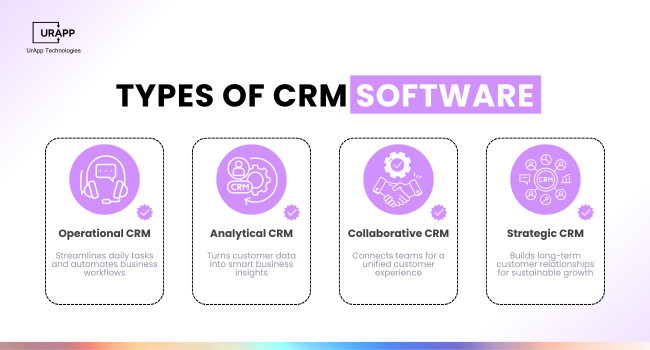
CRM software comes in various types—operational, analytical, collaborative, and strategic—each serving a unique business purpose. Operational CRMs streamline daily tasks like lead management and customer support, while analytical CRMs turn data into insights for smarter decisions. Collaborative CRMs improve team coordination, and strategic CRMs focus on long-term customer relationships and growth. Choosing or developing the right CRM helps startups align their tools with their business goals from day one.
Operational CRM
Supports daily business tasks by automating processes across departments.
-
Automates routine activities like lead assignment, email follow-ups and ticket routing.
-
Manages marketing campaigns and sales pipelines through built-in workflows
-
Enhances customer experience by reducing delays in service and response
Analytical CRM
converts data into knowledge that helps companies make better decisions.
-
monitors consumer preferences, behaviour and purchasing trends
-
finds high-value market niches for focused advertising
-
Optimizes performance using sales and service analytics
Collaborative CRM
Improves communication across teams to offer unified customer support.
-
Shares customer data between sales, marketing and support teams
-
Stores real-time interactions for consistent service delivery
-
Helps avoid duplicate efforts by synchronizing team actions
Strategic CRM
Long-term planning to maintain and expand client connections is the main goal of strategic CRM.
-
increases loyalty by coordinating customer information with corporate objectives.
-
prioritizes high-return consumers and calculates customer lifetime value.
-
allows new businesses to customize experiences and gradually establish trust.
Advantages of Personalized CRM Software
For startups, customized CRM systems offer flexibility, improved control and features that are specifically designed for them.
- Customized User Roles and Workflows
Adapt roles and responsibilities to your own company procedures.
- Better Scalability As the Business Grows
Scales as you grow so you don’t need a new tool each year.
- Direct Integration With Current Tools
Connects seamlessly to your existing platforms for seamless data sync.
- Improved Privacy and Data Security
complies with security regulations and protects your client data.
- Decreased Dependency on External Features
Build only what you require and omit extraneous outside services.
- Customized Dashboards and Tools for Reporting
Dashboards and reports customized to your requirements let you see precisely what matters to you.
- Better Decision-Making
To assist you in making better business decisions, generate reports using your real-time data.
Off-the-Shelf CRM vs Custom CRM Development
Startups choosing between off-the-shelf and custom CRM solutions must weigh speed against flexibility. Off-the-shelf CRMs are quick to deploy and cost-effective for basic needs, but they often include unnecessary features and lack tailored functionality. In contrast, custom CRM development takes more time and resources but offers complete control, better integration with your workflow, and scalability as the business grows.
Below is a detailed comparison to help you choose:
Deployment Time:
Off-the-Shelf CRM:
- Off-the-shelf CRM offers quick deployment within days.
Custom CRM Development:
- Custom CRM requires planning and takes weeks or months to implement
Customization:
Off-the-Shelf CRM:
- Off-the-shelf CRM offers limited customization, restricted to the settings provided by the vendor.
Custom CRM Development:
- Custom CRM solutions are fully tailored to match your unique business workflows and requirements.
CRM Software Cost:
Off-the-Shelf CRM:
- Off-the-shelf CRM has a lower initial cost but typically involves ongoing monthly subscription fees.
Custom CRM Development:
- Custom CRM requires a higher upfront investment but has no recurring license fees.
Ownership od Data:
Off-the-Shelf CRM:
Custom CRM Development:
- With custom CRM, you retain full ownership and control over all customer data.
Integration with Tools:
Off-the-Shelf CRM:
Custom CRM Development:
User Interface:
Off-the-Shelf CRM:
Custom CRM Development:
Scalability:
Off-the-Shelf CRM:
Custom CRM Development:
- Easily scales with your team size and evolving feature requirements.
Support and Upgrades:
Off-the-Shelf CRM:
Custom CRM Development:
- Support and upgrades are managed by your own development team, tailored to your needs.
Security and Compliance:
Off-the-Shelf CRM:
Custom CRM Development:
- Allows implementation of custom security measures to match your specific policies and industry standards.
Long-Term Value:
Off-the-Shelf CRM:
Custom CRM Development:
Startups that plan for future growth often benefit more from custom CRM software development. With custom CRM software, every feature supports your team directly. You avoid unused tools and gain the freedom to adjust as you grow.
If you need help deciding which path suits your business best, read our insights on how to choose the right mobile app development company. For startups focused on growth, flexibility and control, custom CRM software development delivers stronger long-term value
Pros and Cons of CRM Software and Off-the-shelf CRM Software
Off-the-Shelf CRM Software
Pros
-
Quick to implement with minimal setup required
-
Lower upfront cost compared to custom solutions
-
Regular updates and technical support included
-
Reliable and tested by many businesses
-
Easy integration with common tools and platforms
Cons
-
Limited customization for unique business needs
-
Includes unnecessary features that may complicate usage
-
Scalability can become a problem as your business grows
-
Subscription costs add up over time
-
Vendor controls how data is stored and managed
Custom CRM Software Development
Pros
-
Built specifically to match your business processes
-
Offers full control over design features and workflows
-
Simple to scale as your business grows
-
More authority over system access and data security
-
No recurring license or subscription fees
Cons
-
Higher upfront development cost
-
More time required for implementation and design
-
requires regular maintenance and upgrades.
-
Needs an experienced development team
-
More testing required before final rollout
Top 5 CRM Platforms to Check Out in 2025:
Choosing the right CRM can make or break your workflow, especially with how fast things are evolving. Here are five best CRM platform 2025:
1. Salesforce
- Still the king of CRMs. If your business is scaling fast and you need serious automation, AI features, and deep customization Salesforce has it all. It’s not cheap, but it’s powerful.
2. HubSpot CRM
- Clean, simple, and actually fun to use. HubSpot is perfect if you’re just starting out or want a no-stress setup that still offers smart marketing tools and workflows. Bonus: great free plan!
3. Zoho CRM
- Zoho CRM is totally affordable, flexible, and packed with features you’d expect from a premium platform. Their AI assistant (Zia) is getting smarter, and the multichannel tools are solid.
4. Pipedrive
- A favorite for sales teams. Pipedrive keeps things visual and straightforward. No bloated features, just a clean interface and automations that actually help close deals faster.
5. Monday Sales CRM
- Built on the Monday.com platform, this one feels less like traditional CRM and more like a smart, customizable dashboard for your whole team. Great if you're already using Monday for project tracking.
Can Startups Build Their Own CRM?
Yes, startups can build their own CRM if they understand their goals, map out workflows, and commit to development and long-term upkeep. A custom CRM can streamline operations, improve sales processes, and grow with your business.
Complete Customization
Design a CRM that works your way, not the other way around.
- Real alignment: Customize the CRM around your exact sales funnel, customer journey, and internal operations.
- Feature relevance: Avoid bloated tools—include only the functions your team actually uses.
- Operational fit: Build a system that naturally fits your daily workflows, making adoption easier and faster.
Full Control Over Features & Scalability
Own every part of your system with room to grow.
- Feature flexibility: Add, change, or remove features whenever your needs evolve—no waiting on third-party updates.
- Scalable design: Build the CRM in a modular way so it can grow as your business scales.
- Adaptability: Tweak processes, dashboards, and data structures to fit new strategies or departments.
No Recurring Subscription Fees
Pay once to build and avoid long-term costs.
- Fixed ownership: No more monthly payments or pricing tiers as you grow—your system is fully yours.
- Cost efficiency: Although upfront development is higher, you'll save as your team and database expand.
- Financial clarity: Better budget predictability since you're not tied to external price increases.
Seamless Integration
Connect easily with your existing tools and software.
- Tech compatibility: Build it to integrate with your ERP, email tools, marketing platforms, or accounting software.
- No limits: You won’t be restricted by the API or plugin limits found in commercial CRMs.
- Unified systems: Keep all operations under one roof for better efficiency and data accuracy.
Defined Customer Workflows
Build around the real way your team works with customers.
- Journey clarity: Map how leads are captured, nurtured, and converted so your CRM supports each step.
- Process-driven: Eliminate manual work by automating repetitive actions aligned with your process.
- No guesswork: You control every step, so the system mirrors how your business truly operates.
In-House Team or Dev Partner
Choose the right people to bring your CRM to life.
- Internal capability: If you have a capable tech team, you can manage development in-house for tighter control.
- Outsourcing: Work with a trusted software company for expert delivery and faster time to market.
- Tech stack match: Choose technologies (like Flutter or React Native) that suit your platform and long-term goals.
Budget Planning for Build & Maintenance
Plan for both today and tomorrow.
- Two phases: Cover both initial build (design, development, testing) and long-term support (updates, bug fixes).
- Transparency: Share costs with stakeholders so the CRM is seen as an investment, not a liability.
- Long-term vision: Set aside a maintenance budget to avoid future technical debt or limitations.
Security & Compliance Management
Keep your customer data safe and legally compliant.
- Data protection: Use best practices like role-based access, encrypted storage, and secure logins.
- Regulatory compliance: Follow GDPR, HIPAA, CCPA, or other applicable laws depending on your target market.
- Active monitoring: Plan regular audits and monitor logs to spot and fix issues early.
Continuous Improvement & Optimization
Treat your CRM as a product—not a project.
- User feedback: Continuously collect feedback to improve the platform based on real team needs.
- Smart upgrades: Add automation, performance improvements, or new features to stay ahead.
- Growth readiness: Refactor parts of your CRM to ensure it performs well as your startup grows.
Simplicity & User Experience First
Make your CRM easy to use so your team actually uses it.
- Clean UI: Prioritize a clean, fast-loading interface that helps—not hinders—your users.
- Essential tools only: Start lean—include only what’s necessary and expand as needed.
- Built-in support: Add help tips, onboarding guides, and tooltips inside the system to reduce training time.
CRM Software Development Process
The CRM software development process involves several key steps to ensure long-term success. It starts with defining goals and features, followed by wireframing the layout. Developers then build the frontend and backend, integrate third-party tools, and run thorough testing. Once deployed, staff are trained, and ongoing maintenance ensures smooth performance and updates.

- Requirement Analysis
List your goals, needed features and target users clearly before starting.
- Wireframing
Draw layout sketches to help developers and designers plan the CRM.
- Development
Develop the code and design for both frontend and backend.
- Integration
Link external apps, tools and data sources to your CRM.
- Testing
Fix bugs and check performance before launching the CRM.
- Deployment
Make the CRM live and teach your staff on how to use it.
- Maintenance
Resolve issues, provide functionality and maintain system stability.
Technologies Used in CRM Software Development
CRM systems use Node.js, Laravel, or Django for backend, and React, Angular, or Vue for frontend. Data is managed with MySQL, PostgreSQL, or MongoDB, while Flutter or React Native support mobile. Hosting runs on AWS, Google Cloud, or Azure, with REST or GraphQL APIs and smart AI features like lead scoring and chatbots for automation.
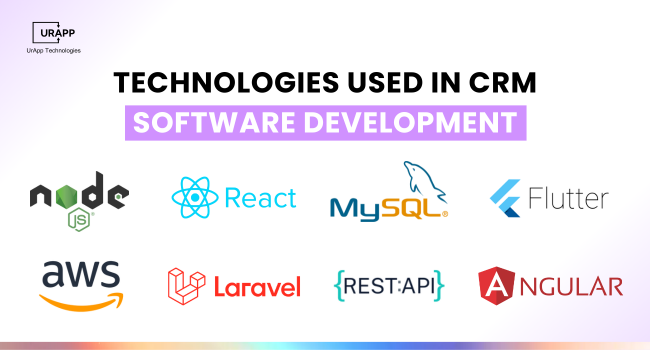
- Backend: Node.js, PHP (Laravel), Django
Power your CRM operations and handle API calls efficiently.
- Frontend: React, Angular, Vue
Build smooth and user-friendly interfaces for better user adoption.
- Database: MySQL, PostgreSQL, MongoDB
Store your user data fast and securely with modern database tools.
- Mobile: Flutter or React Native
Build mobile apps that work on both iOS and Android.
- Hosting: AWS, Google Cloud, Azure
Host your CRM with reliable and scalable cloud services.
- APIs: REST, GraphQL, Webhooks
Connect with other tools and services using APIs.
- AI Features: Lead Scoring, Chatbot Integration
Add AI tools to automate lead tracking and support.
How much does CRM cost?
CRM software costs vary based on size, features, and technology. Basic CRM solutions ($10K–$25K) cover essential features for small teams. Mid-level CRMs ($30K–$70K) offer advanced dashboards and integrations, while advanced systems ($80K–$150K+) include full automation, analytics, and mobile access for enterprise-level needs.
Offers core features and limited user access for small teams.
- Mid-Level CRM ($30K – $70K)
Includes advanced dashboards, roles and integration tools.
- Advanced CRM ($80K – $150K+)
Full automation, data analytics and mobile access features.
Key Factors That Affect CRM Development Costs
The cost of CRM development depends on factors like software complexity, features, tech stack, required integrations, team size, and project duration. Customization, maintenance, and the development team's location also play a key role in the final budget.
- Features & Complexity
Simple tools like contact tracking are quick and affordable. But the more features—like automation, AI insights, or multi-channel support—you add, the more time and budget it takes.
- Design & User Experience
A basic interface is easy. If you want a polished, intuitive UX across web and mobile, expect extra hours in design and front-end work.
- Integrations & Compatibility
Connecting your CRM with third-party tools (like ERPs or marketing platforms) adds complexity. Supporting multiple platforms (web, iOS, Android) will also raise development time and cost.
- Tech Stack & Innovation
Choosing advanced technologies like AI, machine learning, or custom analytics boosts capabilities—but also increases both dev time and maintenance costs.
- Team Size & Expertise
A larger, more experienced team gets the job done faster—but costs more. Rates also vary by region, so where your team is located matters.
- Customization Level
Off-the-shelf CRM with tweaks? Lower cost. Full custom build with tailored workflows and dashboards? Higher cost.
- User Scale & Data Load
More users and larger datasets demand stronger architecture and more testing—especially for role management and performance under load.
- Ongoing Support
CRM isn't “set and forget.” Budget for updates, fixes, security patches, and user support post-launch.
Five Key Steps in the CRM Process
Follow these five steps to use CRM effectively and maximize customer engagement through well-structured workflows and insights.
Identify Customer Needs
Understanding customer expectations is the foundation of effective CRM usage.
-
Conduct surveys or interviews to gather user feedback
-
Use CRM insights to detect common complaints and trends
-
Align offerings with customer goals to increase satisfaction
Collect and Organize Data
Efficient data handling ensures your CRM stays relevant and responsive.
-
Import contact info, transaction history and communication logs
-
Categorize leads by behavior, interest and stage in the sales cycle
-
Store structured and unstructured data for better decision-making
Communicate With Customers
Build strong relationships through consistent and meaningful communication.
-
Set up automated follow-ups for leads and active customers
-
Personalize outreach using customer data and preferences
-
Sync communication channels like email, SMS and chat in one place
With AI process automation, teams can schedule timely responses and avoid manual tracking.
Offer Support and Value
Deliver meaningful assistance that creates long-term brand trust.
-
Resolve issues quickly through integrated support tickets
-
Share resources like guides, FAQs, or product updates
-
Provide value-driven recommendations based on user behavior
Choosing the Best CRM Development Company
Pick a trusted team to build a CRM that fits your goals.
- Proven CRM Project Experience
Work with a team that has launched successful CRM platforms.
- Familiar With Startup Challenges
The right partner understands tight budgets and fast delivery.
- Offers Post-Launch Support
Get help to scale and improve your CRM long-term.
- Transparent Pricing and Timelines
Ask for full cost breakdowns and clear delivery plans.
Use up-to-date tools for better speed and results.
- Provides UI/UX Design Assistance
Ensure your CRM looks clean and is easy to use.
- Offers Agile Development Sprints
Build the CRM in short steps with regular updates.
Conclusion
CRM software development improves how startups manage leads, automate tasks and understand their customers. A custom CRM offers better control, full flexibility and long-term savings. CRM software cost depends on many factors, but it is a smart investment for startups ready to scale. It supports customer retention, marketing performance and internal operations. If you want to add your own features, automate workflows and grow smarter, partner with UrApp Tech today.