Android vs iOS Development: You’ll Regret Choosing Wrong
What is the difference between Android and iOS?
Android is an open-source system used by many brands like Samsung and Xiaomi. It offers more customization and a wide range of phones at different prices. However, updates and security can vary between devices. iOS is Apple’s closed system, found only on iPhones. It offers a smoother, more secure experience with regular updates, but gives users less control to customize and comes with fewer device options, usually at higher prices.
It is very important for companies to choose between Android vs. iOS development in the world of mobile technology. To use these platforms well, one must understand how they vary from each other. Since Android is open-source and supports various screens and devices, it gives users more opportunities for customization. Unlike Android, iOS sticks to stricter standards, providing users with a more efficient experience. Therefore, you get fewer chances to modify the software according to your needs.
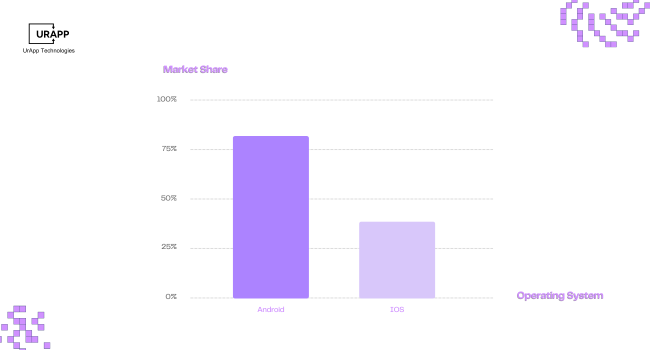
This year’s predictions show that Android will have a 72% global smartphone market share at the end of 2025, with 28% going to iOS. Developing apps means it is essential to learn about the unique features of each system.
What is Preferable Among iOS and Android?
The choice between iOS and Android depends on your priorities. In a controlled ecosystem, iOS often offers a premium user experience, faster development, and strong security. There are many advantages to Android, including a wider global market reach, greater flexibility, faster deployment, and a variety of devices to reach a variety of demographics.
Determining is difficult, The debate over Android vs. iOS development is still ongoing among users and developers. Reddit users have expressed a variety of perspectives, that highlights the positive and negative aspects of each site.
iOS App Development
-
iOS offers seamless performance and is renowned for its frequent upgrades, quick response times and effective multitasking.
-
Users can transition between jobs without any disruptions because of Apple products' seamless integration.
-
iOS has excellent security, reducing the possibility of malware and illegal access.
-
Strict quality controls are upheld by the App Store to provide a reliable and consistent experience.
-
iOS devices retain performance over time, with regular updates.
Android App Development
-
Android offers unmatched device variety across every price range.
-
Personalized shortcuts, widgets and home screens are made possible by customization choices.
-
Higher refresh rates, expandable storage and quicker charging are supported by many Android phones.
-
There are many different apps and third-party stores available in the Google Play ecosystem.
Languages for Android vs. iOS Development
Choosing the appropriate programming language is crucial when developing for iOS vs. Android. Both platforms have preferred languages that are unique to their respective ecosystems.
iOS Development
The primary languages for iOS development are Swift and Objective-C. With Swift, you get modern syntax and high performance, while Objective-C has a steeper learning curve, but it's more established. Swift and Objective-C support interoperability, with Swift integrating well with Objective-C.
|
Feature |
Swift |
Objective-C |
|
Syntax |
Modern and concise |
Verbose and complex |
|
Performance |
High |
Moderate |
|
Learning Curve |
Easier for beginners |
Steeper |
|
Community Support |
Growing rapidly |
Established |
|
Interoperability |
Seamless with Obj-C |
Compatible with C++ |
Android Development
Java and Kotlin are the main languages for developing Android apps. Java has extensive community support and reliable performance, while Kotlin offers concise syntax, improved features, and is easier to learn. Java and Kotlin are fully interoperable.
|
Feature |
Java |
Kotlin |
|
Syntax |
Verbose |
Concise and expressive |
|
Performance |
Reliable |
Improved with features |
|
Learning Curve |
Moderate |
Easier for new devs |
|
Community Support |
Extensive |
Rapidly growing |
|
Interoperability |
Compatible with Kotlin |
Fully Java-compatible |
Development Environment
A development environment is a dedicated workspace for software developers. It provides all the necessary tools—like integrated development environments (IDEs) and version control systems—to build, test, and fix software safely, without impacting active systems.
The development environment shapes productivity in Android vs. iOS development.
iOS Development Environment
The iOS development environment uses Xcode as its IDE, with Swift and Objective-C for languages. XCTest and Instruments handle testing, Interface Builder for UI, and the Apple App Store for deployment.
|
Feature |
Description |
|
IDE |
Xcode |
|
Languages |
Swift, Objective-C |
|
Testing Tools |
XCTest, Instruments |
|
UI Design |
Interface Builder |
|
Deployment |
Apple App Store |
Android Development Environment
The Android development environment uses Android Studio as its IDE, with Java and Kotlin for languages. Espresso and JUnit handle testing, the Layout Editor for UI, and the Google Play Store for deployment.
|
Feature |
Description |
|
IDE |
Android Studio |
|
Languages |
Java, Kotlin |
|
Testing Tools |
Espresso, JUnit |
|
UI Design |
Layout Editor |
|
Deployment |
Google Play Store |
Design Differences
With flat elements, tab bars, and gestures, iOS Design prioritizes simplicity, clarity, and a unified look. With its bold colors, animations, customizable components, and ability to adapt to various devices, Android Design follows Material Design.
Design principles vary in iOS vs. Android development, impacting user experience.
iOS Design
-
Emphasizes simplicity and clarity.
-
Uses flat elements with subtle gradients.
-
Navigation with tab bars and gestures.
-
Standard UI components across devices.
-
Unified look across Apple platforms.
Android Design
-
Follows Material Design guidelines.
-
Bold colors and responsive animations.
-
Navigation via drawers and floating buttons.
-
Customizable UI components.
-
Adapts to various device sizes and types.
Development Complexity
Since iOS Development is limited to fewer devices and OS versions, there is less extensive testing, and tools can be integrated more easily, though app guidelines are strict. The Android Development platform faces a wider variety of devices and multiple OS versions, requiring more comprehensive testing, but it also offers flexible guidelines and tools that are customizable.
Understanding complexity is key in developing for Android vs. iOS.
|
Aspect |
iOS Development |
Android Development |
|
Device Fragmentation |
Limited models |
Wide device variety |
|
OS Versions |
Fewer versions |
Multiple in use |
|
Testing Requirements |
Less extensive |
More comprehensive |
|
App Guidelines |
Strict |
Flexible |
|
Tools Integration |
Streamlined |
Customizable |
If you're asking how hard is to make an app, both platforms pose different challenges. Android’s fragmentation and testing are demanding, while iOS requires strict adherence to Apple's policies.
iOS App Testing
For iOS apps to function flawlessly, fulfil quality requirements and adhere to Apple's App Store policies, thorough testing is necessary. Every tool and technique used in the iOS testing process has a distinct function in the development and deployment lifecycle.
1. XCTest for Unit and UI Testing
Apple's official testing framework, XCTest, is incorporated into Xcode. It gives developers a strong means of confirming the dependability and functionality of their code by supporting both unit testing and user interface testing.
Unit Testing
- Developers write test cases to check the logic of individual functions, methods and components. These tests help catch bugs early during development and ensure that each unit of the codebase behaves as expected.
UI Testing
- XCTest enables automated user interface interaction by mimicking user actions such as text input, swipes and taps. By verifying that the user interface reacts appropriately to user input, these tests provide a seamless user experience.
Integration
- Because of its close interaction with Xcode, XCTest facilitates continuous integration processes, test-driven development (TDD) and real-time feedback inside the IDE.
2. Instruments for Performance Analysis
Instruments is a performance analysis and debugging tool bundled with Xcode. It helps developers monitor and optimize app performance across various parameters.
Memory Usage
- Detects memory leaks, retain cycles and excessive memory consumption.
CPU Utilization
- Analyze CPU spikes and optimize algorithms or processes that cause heavy usage.
Battery Life
- Identify operations draining the battery and make improvements to enhance power efficiency.
Animation & Rendering
- Measure frame rates and identify missing frames to ensure smooth animations and transitions. Before making the app available to customers, developers can use Instruments to increase the app's speed, stability and efficiency.
3. TestFlight for Beta Testing
TestFlight is Apple’s official platform for distributing beta versions of apps to internal and external testers.
Internal Testing
- Up to 25 internal team members can test the app using their Apple IDs. This allows for early-stage feedback and identification of bugs.
External Testing
- Developers can invite up to 10,000 testers via email or public links. External users help validate the app across different usage scenarios and environments.
Feedback Loop
- Testers can easily submit comments using TestFlight, along with screenshots and thorough issue descriptions. To improve the app, developers utilize this data.
Easy Updates
- Testers receive over-the-air updates, making it simple to distribute new versions without relying on third-party services.
4. Simulators for Device Variation
iOS Simulators are virtual devices that mimic the behavior of actual iPhones and iPads. They help developers and testers evaluate the app across multiple devices and configurations.
Device Simulation
- Test the app on different iPhone and iPad models, screen sizes, iOS versions and orientations without needing physical hardware.
Faster Debugging
- Simulators are integrated into Xcode and allow quick builds and rapid iteration during development and testing.
Limitations
- Although simulators are helpful for functional testing, they might not be appropriate for performance benchmarking because they are unable to replicate specific hardware features (such as camera, motion sensors, or battery performance).
5. Strict App Store Review
After testing, every app must undergo Apple’s App Store review process before it becomes publicly available.
Compliance Checks
- Apple examines the app to make sure it complies with its App Store Review Guidelines, which address UI design, content, security, privacy and functioning.
Common Rejection Reasons
- Apps may be rejected for crashes, broken links, insufficient content, misleading metadata, or use of private APIs.
Testing Standards
- Ensuring the app is thoroughly tested using XCTest, Instruments and TestFlight can greatly reduce the risk of rejection.
Approval Time
- Review typically takes 24–48 hours but can vary based on app complexity and guideline compliance.
Android App Testing
Thorough testing is necessary to deliver a stable and flawless mobile experience. Android provides a multitude of platforms and tools for testing apps in various user settings, devices and scenarios. To guarantee functionality, reliability and compatibility, companies developing for Android vs. iOS must be aware of the testing infrastructure that is available.
1. JUnit for Unit Testing
JUnit is the standard testing framework for Android used to validate individual units of code, such as classes and methods.
Core Logic Testing
- JUnit helps developers verify that business logic works correctly in isolation from Android framework dependencies.
Fast Execution
- These tests run on the local Java Virtual Machine (JVM), allowing quick feedback during development.
Mocking Support
- Commonly used with tools like Mockito to simulate dependencies, making tests more focused and reliable.
2. Espresso for UI Testing
Espresso is Android’s native UI testing framework designed to simulate real user interactions.
User Interface Verification
- Espresso tests validate that UI elements behave as expected under different conditions such as taps, swipes, text input and screen rotations.
Synchronized Execution
- The framework handles background processes and asynchronous tasks automatically, reducing test flakiness.
Integration with Android Studio
- Developers can run and debug tests directly within the IDE, ensuring faster issue identification.
3. Firebase Test Lab for Cloud Testing
Firebase Test Lab allows developers to test their apps on a wide range of real Android devices hosted in the cloud.
Scalable Device Testing
- Run tests on various hardware models, screen sizes and Android versions without maintaining physical devices.
Automated & Manual Testing
- Supports instrumentation tests like Espresso as well as Robo tests, which automatically crawl the app and report crashes or UI issues.
Comprehensive Reports
- Offers logs, screenshots, and performance metrics that help improve stability and usability before release.
4. Emulators Simulate Device Configurations
Android Emulators provide a virtual testing environment directly within Android Studio.
Multi-Device Coverage
- Developers can simulate different device models, resolutions and Android OS versions for broader compatibility testing.
Debugging Features
- Emulators offer built-in tools to test features like GPS, network speed and device sensors.
Ideal for Early Testing
- While not a replacement for real devices, emulators are excellent for development-stage debugging and functional testing.
5. Google Play Console for Pre-Launch Reports
Before an app goes live, the Google Play Console generates pre-launch reports to identify issues on real devices via Firebase Test Lab.
Automatic Testing
- Google tests your app automatically for crashes, ANRs (App Not Responding errors) and permission problems.
Accessibility Check
- Reports highlight any accessibility or compatibility issues, ensuring broader user reach.
Visual Feedback
- Includes screenshots and videos to help developers understand how the app behaves across devices and languages.
Development Cost - Android vs iOS
Developing apps for Android and iOS comes with different cost considerations. With diverse tools and accessible environments, Android development is more affordable upfront, but testing and long-term maintenance are more expensive. Compared to Android development, iOS development involves a higher initial investment - such as Apple hardware and developer program fees - but also benefits from a more uniform ecosystem.
Android App Development Cost
Android app development costs range from $20,000 to $100,000+, depending on complexity, features, and maintenance needs. Extra time is often required for device compatibility, UI design across various screen sizes, and thorough testing. While development tools like Android Studio are free, testing across multiple devices can add to the overall cost.
Factors Influencing Android App Development Cost:
-
Device Compatibility
It can take more time to design and test Android apps because they need to be optimized for a variety of devices made by different manufacturers. -
Development Tools
Android development uses Android Studio, with Kotlin and Java as the primary programming languages. These tools are open-source and free, reducing licensing costs. -
UI/UX Design Costs
Designing for multiple screen sizes and resolutions can require additional UI work, leading to higher design hours.
-
Testing & Debugging
Extra resources are often required to test across numerous devices and OS versions, especially when using Firebase Test Lab or physical device farms. -
Average Cost Estimate
The cost of developing an Android app can vary from $20,000 to $100,000+, depends on its complexity, maintenance and upgrades .
iOS App Development Cost
When clients ask, how much does iOS app development cost? The cost of developing an iOS app ranges from $10,000 to over $200,000, depending on complexity and features. Apple’s consistent devices reduce testing time, lowering some costs. However, higher design standards, macOS hardware needs, and strict App Store reviews can increase expenses. Key factors include UI/UX design, backend integration, and ongoing maintenance.
Factors Influencing IOS App Development Cost:
-
Device & OS Uniformity
Apple’s limited number of devices and standardized OS versions reduce testing time, which can lower QA costs. -
Development Tools & Language
iOS apps are developed using Xcode with Swift or Objective-C. Xcode is free, but macOS-based hardware is required, which can add hardware costs for development teams. -
Design Expectations
Apple users generally expect a polished and refined user interface, which often leads to higher design and development standards. -
App Store Review Time
The App Store’s strict review guidelines may require more time and iterations before approval, slightly affecting the timeline and associated costs. -
Average Cost Estimate
The price range for developing an iOS app typically ranges from $25,000 to over $120,000, based on the level of backend connectivity, design and functionality.
Pros and Cons of Android App Development
Android app development is flexible, offers wide market reach, and benefits from powerful, open-source tools with multiple distribution options. However, it faces challenges like device fragmentation, extensive testing needs, lower revenue per user, higher security risks, and slower OS update adoption.
Pros
|
Advantage |
Description |
|
Customization |
Flexible and versatile options |
|
Market Reach |
Broad global access |
|
Tools Access |
Powerful development resources |
|
Open Source |
Encourages innovation |
|
App Stores |
Multiple distribution channels |
Cons
|
Disadvantage |
Description |
|
Fragmentation |
OS/device diversity |
|
Testing Effort |
Requires wider testing |
|
Revenue Yield |
Lower per-user returns |
|
Security Risks |
Higher vulnerability |
|
Update Lag |
Delayed OS adoption |
Pros and Cons of iOS App Development
iOS app development offers a polished UI, strong monetization, high security, simplified development due to hardware uniformity, and loyal users. However, it requires higher costs, has strict App Store rules, limited design flexibility, is restricted to Apple devices, and has a smaller global reach.
Pros
|
Advantage |
Description |
|
User Interface |
Polished and uniform |
|
Monetization |
Strong revenue opportunity |
|
Security |
High-level protection |
|
Hardware Uniformity |
Simplifies development |
|
User Loyalty |
Strong retention rates |
Cons
|
Disadvantage |
Description |
|
Development Cost |
Higher investment required |
|
Store Rules |
Strict submission policies |
|
Design Limits |
Less flexibility |
|
Device Scope |
Limited to Apple hardware |
|
Market Reach |
Smaller global footprint |
If you're not using the right framework in programming, development efficiency and scalability can be compromised, no matter which platform you choose.
iOS and Android Development Market Share In 2025
Android dominates the mobile OS market with 72%, while iOS holds 28%. Android leads in Asia, Africa and South America. iOS remains strong in North America, Europe and Australia due to higher consumer spending.
Choosing Between Android and iOS Development
The Android platform offers broad market reach, flexibility, and low initial costs, but requires extensive testing due to fragmentation and low revenues per user. Apple's iOS development, on the other hand, benefits from a uniform device ecosystem, boosted monetization potential, and improved security, as well as higher development costs and stricter App Store policies. The choice depends on your target market, budget, and app complexity.
| Factor | Android Development | iOS Development |
|---|---|---|
| Target Audience | Large user base in Asia, Africa, and emerging markets | Strong presence in North America, Europe, and affluent users |
| Revenue Model | Mainly ad-based revenue | Higher revenue from in-app purchases and paid apps |
| Device Diversity | Wide range of devices and screen sizes; extensive testing required | Limited devices; simpler testing and development |
| Development Tools | Android Studio with Kotlin/Java (open-source) | Xcode with Swift/Objective-C (requires macOS) |
| Testing & QA | Complex due to fragmentation | Easier due to hardware and OS uniformity |
| UI/UX Design | Flexible but challenging to optimize for all devices | Polished, uniform design with strict guidelines |
| App Store Policies | Multiple stores with varied submission rules | Strict App Store review process; can delay launch |
| Security | More vulnerable due to open ecosystem | Higher security and privacy controls |
| Market Reach | Larger global market share | Smaller but higher-spending user base |
| Development Cost | Generally lower but can increase with complexity | Typically higher upfront investment |
| Update Adoption | Users slower to adopt latest OS versions | Faster OS adoption ensures quicker feature access |
| Monetization | Better for ad-based and freemium models | Better for subscriptions and premium apps |
If you're thinking about how hard it is to make an app, weigh the tools, resources and developer availability for both platforms. Also, avoid common mobile app development mistakes like skipping user testing or choosing the wrong tech stack.
Conclusion
Android vs. iOS development involves trade-offs. Android is ideal for global access and flexibility, while iOS excels in monetization and uniformity. Choose based on your market, goals and resources. Partner with UrApp Tech for expert support.