How Hard is it to Make an App: Guide For Non-developers 2025
Creating an app in 2025 is no longer limited to developers. With modern no-code and low-code tools like Adalo, Glide, or FlutterFlow, non-developers can now build apps quickly, affordably, and without technical expertise. This guide walks you through each stage — from validating your idea and choosing the right platform, to designing, building, testing, and launching. It also compares different development approaches (no-code vs full-code), helping you understand what’s realistically achievable for beginners and when to hire experts.
What is Mobile App Development?
Mobile app development is the process of building software applications specifically for mobile devices. The process begins with the generation of ideas and market research, followed by the design of the user interface and the coding of the app's features. In addition, ongoing support is provided after launch to ensure a seamless user experience.
Mobile apps are expected to produce more than 613 billion US dollars in revenue by 2025, with mobile games that accounts for the largest revenue share among all app genres. This figure highlights the huge potential for app creators.

To create an app you need several key components. First, one must identify the target audience, Understand who will use the app and help influence the design and functionality. Next, define the app's purpose. A clear objective guides the development process.
The platform choice is another important element. It is possible to create apps for iOS, Android, or both. Every platform has a unique set of needs and target audience. As a result, deep knowledge on how to create an app for each platform is necessary for success.
 How to Create an App for Android?
Android app development involves several steps. One needs to select appropriate tools and technologies for the development process. The official Integrated Development Environment (IDE) for creating Android smartphone apps exists through Android Studio. This tool contains vital capabilities like code manager functions alongside debugging tools along with tools for performance examination.
Choose the Right Tools
- To create an app for Android, start with the right tools. Android Studio provides a complete setup to design, build, and test your app efficiently. It comes with everything you need to bring your app idea to life. If you prefer expert guidance, hiring professional Android app developers can make the process faster and smoother.
Plan the User Interface
- Once your tools are ready, focus on how your app looks and feels. A clean and simple layout makes the app easy to use and navigate. The design should align with your app’s purpose and meet users’ expectations. Tools like Figma, Adobe XD, or Sketch can help you create an intuitive and visually appealing interface. A well-planned UI keeps users engaged and coming back to your app.
Develop the App
- Once the design is ready, it’s time to bring your app to life. Developers use Android Studio and other tools to build the app’s features, making sure everything works smoothly. They focus on functionality, performance, and usability so your app delivers a great experience for users.
Testing the App
- Quality assurance is a crucial step in Android app development. Testing ensures your app works smoothly across different devices and screen sizes. Using tools like TestFairy, BrowserStack, or Firebase Test Lab, developers can identify and fix issues early, improving the app’s reliability and overall user experience. Thorough testing helps make sure your app runs flawlessly before it reaches your users.
Launch the App
- Once testing is complete, it’s time to launch your app. Before publishing on the Google Play Store, you’ll need a developer account. Following Google’s submission guidelines ensures a smooth approval process. In addition, using effective marketing strategies can help your app reach more users and increase downloads.
Android App Development Cost
The cost of building an Android app depends on features and complexity. A simple app may start around $5,000–$10,000, while a more complex app with advanced features can go up to $50,000 or more.
 How to Build an iOS App?
iOS app development requires a different approach. The official IDE provided by Apple which developers use to create iOS applications is XCode. Through XCode developers can access multiple tools which assist them in design and develop the application before they perform testing activities.
Set Up the Development Environment
- The first step in iOS app development is setting up the right environment. Installing Xcode is essential, as it provides all the tools needed to design and build your app. Familiarizing yourself with Xcode’s interface helps streamline the development process and makes creating your app much easier.
Design the User Interface
- Creating an easy-to-use interface is a key focus during the design phase. Following Apple’s Human Interface Guidelines helps ensure your app looks appealing and functions intuitively. A design that meets user expectations improves usability and keeps users engaged with your app.
Choose the right Programming Language
- Next, developers must choose a programming language. Swift maintains its status as the top iOS programming language because it provides developers with simplicity and performance benefits. However the usage of Objective-C continues although developers primarily use Swift.
Test the App Properly
- To create an app for iOS, testing holds great importance. Developers use XCTest to run unit tests and UI tests. These tests help check if the app works well on different devices. Early issue detection helps avoid problems during launch.
Submitting the App
- After testing the developer submits the app to the App Store for evaluation. To succeed during the submission process developers must follow Apple’s guidelines exactly to prevent Apple from rejecting the application. The implementation of appropriate marketing techniques enables better spread and more downloads of the app.
Curious About iOS App Costs?
Discover how much it really costs to develop an iOS app in 2025 and what factors affect your budget.
Check iOS App Costs Now
 How to Create an App in Flutter?
- Flutter achieves success as a preferred development platform because this framework in programming allows developers to build applications for both Android and iOS from a single codebase. To use Flutter developers must start by installing the Flutter SDK together with setting up their development environment.
Install the Flutter SDK
- The first step in creating a Flutter app is installing the Flutter SDK. This setup helps you create a proper development environment for your project. Taking time to explore the official Flutter documentation will give you useful insights and make the development process much easier.
Design the App with Flutter
- To create an app with Flutter, use its widget system. Widgets help build clear and flexible user interfaces. Flutter also has a hot reload tool that shows changes quickly. This saves time and helps developers try new ideas with ease.
Coding the Application
- For coding, Dart serves as the programming language for Flutter. Dart presents both simple learning principles and advanced functionality that leads developers to create appealing responsive apps. It is wise to evaluate the Flutter vs React Native debate before deciding on a framework when you feel unsure about coding.
Testing the Flutter App
- Testing in Flutter involves using the built-in testing framework. Developers can conduct unit tests, widget tests and integration tests. This thorough testing process ensures the app functions correctly across platforms. Identifying issues early improves the overall quality.
Launch the App
- To create an app with Flutter, end the process by launching it. Build separate files for Android and iOS. Follow the rules of each app store before submission. Use smart marketing methods to reach more users and grow your app.
Flutter App Development Cost
The cost of building a Flutter app depends on features and complexity. A simple cross-platform app may start around $8,000–$15,000, while a complex app with advanced functionality can go up to $50,000 or more.
 How to Create a Hybrid App?
The fundamental design principle of hybrid applications merges native and web-based application characteristics. With this approach developers build one application that operates across multiple system platforms. Hybrid app development frameworks consist mainly of React Native and Ionic.
Selecting the Right Framework
- The first step in hybrid app development is choosing the right framework. React Native uses JavaScript, while Ionic is built with HTML, CSS, and JavaScript. Developers should select a framework based on their skill set, project goals, and desired app performance. Understanding the strengths of each framework helps businesses make informed decisions. Partnering with a hybrid app development company ensures your project is built using the most efficient tools and frameworks for seamless cross-platform performance.
Designing the User Interface
- Designing a hybrid app requires a focus on responsiveness. Developers must implement design features that adapt to different screen dimensions and orientations in the application. Structured user interfaces both improve user experience and enhance their engagement level.
Write Code in a Hybrid Setup
- To create an app in a hybrid setup, use web technologies. Developers reuse web apps and place them inside a hybrid shell. Clean code gives better speed and a smoother user flow.
Test the Hybrid App
- Use tools like Appium or Detox to run tests. These tools check how the app works on different phones and systems. Strong testing helps catch errors and improve the app before launch.
Submit the Hybrid App
- After tests, move to the launch step. Submit the app to stores by following native app rules. Good marketing helps more users find and install your app.
Hybrid App Development Cost
The cost of building a hybrid app depends on features and complexity. A simple app may start around $7,000–$12,000, while a more complex app with advanced functionality can go up to $45,000 or more.
The Mobile App Development Process
Ideation Phase
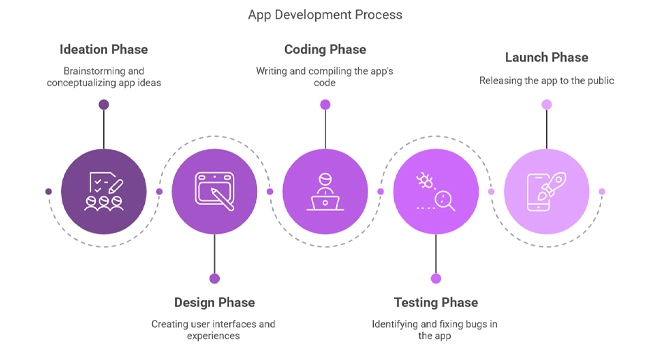
- The initial ideation stage begins by generating concepts before establishing the main purpose of the app. The foundation for the entire project gets established at this stage. Effective stakeholder involvement during the development process leads to increased creativity alongside innovative solutions.
Design Phase
- Wireframes along with prototypes receive attention during the design phase. The graphic design assists users in comprehending how the app looks and how it functions. Effective design improves communication and alignment among team members.
Coding Phase
- The coding phase follows, where developers write the actual code. This stage requires collaboration among team members to ensure consistency and quality. Utilizing version control systems enhances teamwork and code management.
Test the App at Every Step
- In learning how to create an app, testing plays a key role. Run tests throughout the process to catch problems early. Let users try a beta version to collect feedback and improve the app.
Launch the App with a Clear Plan
- At the final step, publish the app on the app stores. Use strong marketing efforts to reach users. A well-planned launch increases your chances of success.
Technology Used in App Development
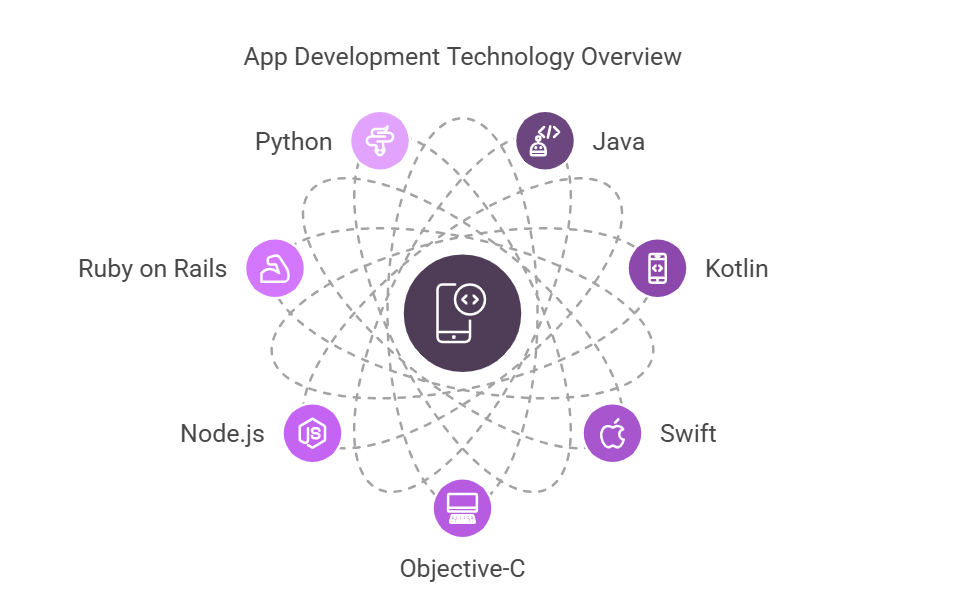
Your tool selection is based on the platform and requirements of the app. Kotlin or Java are used in Android apps. Apps for iOS run on Objective-C or Swift.
Flutter apps use a widget-based architecture and are compatible with Dart. HTML, CSS and JavaScript are web tools that hybrid apps use. Understand these tools helps developers make better decisions throughout the process.
Your program is also supported by backend systems. Ruby on Rails, Python and Node.js are used by many developers. AWS and Firebase are two cloud platforms that support data storage and app maintenance.
Best Monetization Methods for Apps
The process of turning an app into revenue depends on multiple strategies. Developers can choose between asking users to buy items inside their applications or charging regular fees or placing advertising content in their products.
In App Purchases
- It allows users to buy additional features or content. This approach can generate significant revenue if executed correctly.
Subscription Models
- Subscriptions provide a steady income stream. Users pay a recurring fee for continued access to the app's features. This model works well for apps that offer continuous services or regularly updated content.
Advertising Revenue
- People can generate incomes by using advertisements as another form of revenue. Through integrated ads developers acquire revenue whose amounts depend on user behavior in their apps. Well-placed advertisements can lead to increased revenue streams while maintaining smooth user interactions.
Freemium Model
- Users accessing apps under the freemium model receive basic free functionality together with premium add-ons for payment. The fundamental application capabilities remain free to users but developers provide additional functionalities through fee-based premium services. Due to its wide audience appeal the chosen approach leads to maximum conversions.
Conclusion
Building a mobile app in 2025 doesn’t have to be complicated. Whether you choose Android, iOS, Flutter, or a hybrid approach, the key is to plan carefully and follow each step: from brainstorming your idea, designing the interface, writing the code, testing, and finally launching your app.
Choosing the right way to make money from your app, like in-app purchases, subscriptions, ads, or a freemium model, can help it succeed.
With the right tools, a clear plan, and some guidance, anyone can turn an idea into a real, working app that people will love.